1.1. Introduction to R
1.1.2. Key Concepts in SAS vs R Programming
1. Understanding Package Terminology
**Packages**
Collections of functions, data, documentation, and sometimes underlying code (e.g., C++) packaged together to extend R's functionality
Your R installation includes several base packages that provide essential functionality
There are over 18,000 community-contributed packages spanning virtually all domains of analysis
Each package typically focuses on specific tasks or methods (visualization, modeling, etc.)
**Functions**
Similar to SAS macros, functions are reusable blocks of code that perform specific tasks
Functions accept input arguments and return outputs in standardized ways
Unlike SAS macros, R functions are first-class objects that can be passed as arguments
R functions follow consistent naming and documentation conventions
**Repositories**
Central locations where packages are stored and distributed:
CRAN (Comprehensive R Archive Network): Most common, carefully curated
Bioconductor: Specialized in bioinformatics and genomics
GitHub: Cutting-edge packages with less formal review process
R-Forge: Collaborative development platform for R packages
**Libraries**
Directories on your machine where packages are installed for access and reuse
The term "library" refers to the location where packages are stored
R maintains separate library paths for system and user-installed packages
You must explicitly load packages from libraries before using their functions
2. Components of Statistical Software
Statistical software platforms like SAS and R all contain five fundamental components:
- Data Input and Management: Systems for reading, transforming, and organizing data
- Statistical and Graphical Procedures: Tools for analyzing data and creating visualizations
- Output Management System: Frameworks for extracting and customizing output (ODS in SAS)
- Macro Language: Methods to reuse and automate sets of commands
- Matrix Language: Capabilities for implementing algorithms through matrix operations
Key Differences in Implementation:
- SAS implements these five areas as separate systems with different rules and syntax
- Most SAS users only learn the first two components
- R integrates all five components into one consistent language system
- This integration gives R significant advantages in flexibility and power
Output Management Contrast:
- SAS procedures print all output at once
/* SAS prints all descriptive statistics */ PROC MEANS DATA=mydata; RUN; - R stores results as objects that can be selectively accessed
# R stores results in an object result <- summary(mydata) # Access specific parts as needed result$min result$max - R's approach makes output management easier but produces less publication-ready results by default
- SAS produces more polished output but it's harder to use for further analysis

This fundamental architectural difference explains why R has become the preferred language for developing new statistical methods and why the transition from SAS to R requires adapting to a different analytical mindset.
3. Programming Conventions
Understanding programming conventions is essential when transitioning from SAS to R:
Data Management Practices
- Practice Data: R offers multiple ways to generate practice data and includes example datasets
- Location Management: Example programs typically look for data files in a specified directory (e.g., "myRfolder")
- Self-Contained Code: Each example loads its data independently to prevent interference from previous operations
- Reproducibility: This approach ensures that each program can run on its own without dependencies
Program Structure and Documentation
- Header Comments: Every program begins with comments stating its purpose and filename
# R Program for Calculating BMI # BMI_Calculator.R # Author: Jane Smith # Date: 2023-06-22 # Purpose: Calculate BMI from height and weight data - File Naming: Consistent naming conventions across languages (e.g., SelectingVars.sas, SelectingVars.sps, SelectingVars.R)
- Parallel Examples: Programs performing the same task in different languages use identical base filenames
- Comments: Detailed annotations explain functionality and decision points
Data Storage Conventions
- File Format: R data objects are stored in .Rdata files with matching names (e.g., mydata stored in mydata.Rdata)
# Saving an R data object save(mydata, file = "myRfolder/mydata.Rdata") # Loading an R data object load("myRfolder/mydata.Rdata") - Workspace Management: Complete workspaces including data objects and functions can be stored
# Save entire workspace save.image("myRfolder/myWorkspace.Rdata") # Load entire workspace load("myRfolder/myWorkspace.Rdata") - Object Permanence: Saving objects allows consistent retrieval across sessions
- Cross-Platform Compatibility: .Rdata files maintain consistent format across operating systems
Resource Access
- Online Repository: Example files can be downloaded from dedicated websites
- Documentation: Clear documentation of where to find supporting materials
- Organization: Related files are grouped together for easier navigation
- Modification Guidance: Examples are structured to be easily adaptable to different environments
These conventions facilitate learning by providing consistent examples that can be modified and extended as you develop proficiency in R programming.
4. Typographic Conventions
Understanding typographic conventions is crucial for learning programming languages effectively:
Font Styling
- Code Formatting: All programming code, R package names, and function names appear in
courier font - Document References: Names of other documents and menus appear in italic font
- Menu Navigation: Menu paths are shown in the format File > Save as, indicating "choose Save as from the File menu"
Case Conventions
- SAS: Commands and statements appear in UPPERCASE to distinguish them from user-defined names
- R Language: Uses exact case as required since R is case-sensitive
- Naming Convention: User-defined objects in examples typically include the prefix "my" (e.g.,
mydata,mySubset) to distinguish them from built-in functions
Input and Output Distinction
Prompt Symbols: R console examples retain the input prompt symbols:
>indicates the start of a new command+indicates continuation lines of the same command
Example Format: Input lines are clearly separated from output lines
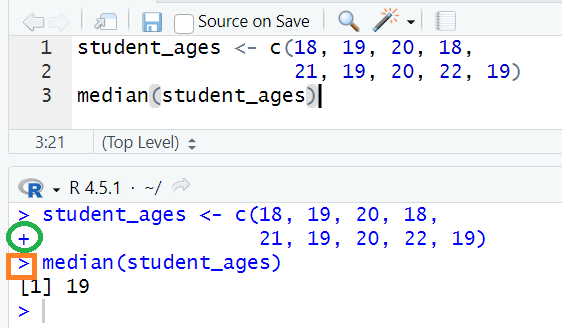
Spacing: Additional spacing is sometimes used to improve legibility of code examples
Output Markers: R prefixes output lines with indicators like
[1]which shows the index of the first element displayed
Educational Approach
- Consistent Style: These typographic conventions are maintained throughout documentation
- Visual Distinction: Helps learners differentiate between commands, variables, and output
- Reduced Confusion: Clear visual separation prevents confusion when transitioning between languages
- Learning Aid: Consistent formatting supports more efficient comprehension of concepts