1.3 Writing Code
1.3.4 Logical Operators in R
Logical operators in R are fundamental building blocks for data analysis, enabling you to compare values, filter datasets, and implement sophisticated decision-making logic. This comprehensive guide covers everything from basic operations to advanced techniques, performance optimization, and error handling strategies.
1. Overview of R Logical Operators
Logical operators compare values and return one of three possible outcomes: TRUE, FALSE, or NA. These outcomes are essential for:
- Flagging conditions in data quality checks
- Subsetting rows based on complex criteria
- Implementing decision-making logic in analytical workflows
- Creating conditional variables for modeling
They operate element-by-element when used with vectors or data frame columns, making them highly efficient for data manipulation tasks.
2. Comprehensive Logical Operators Reference
2.1 Basic Comparison Operators
| Operator | Description | Returns TRUE When… |
Example | Use Case |
|---|---|---|---|---|
> |
Greater than | Left value > right value | AVAL > 100 |
Threshold detection |
< |
Less than | Left value < right value | BASE < 100 |
Lower limit checks |
>= |
Greater than or equal | Left value ≥ right value | AVAL >= 110 |
Inclusive thresholds |
<= |
Less than or equal | Left value ≤ right value | BASE <= 100 |
Upper limit validation |
== |
Equal to | Values are identical | AVAL == BASE |
Exact matching |
!= |
Not equal to | Values differ | AVAL != BASE |
Exclusion criteria |
2.2 Advanced Logical Combinations
| Operator | Description | Behavior | Example | Performance |
|---|---|---|---|---|
& |
Element-wise AND | Vectorized operation | AVAL > 100 & BASE < 140 |
Fast |
| |
Element-wise OR | Vectorized operation | AVAL < 100 | BASE == 100 |
Fast |
! |
Logical NOT | Negation operator | !(AVAL > 120) |
Fast |
&& |
Single-element AND | Short-circuit evaluation | x > 0 && y < 10 |
For conditionals |
|| |
Single-element OR | Short-circuit evaluation | is.null(x) || x > 5 |
For conditionals |
2.3 Specialized Functions
any(): ReturnsTRUEif at least one element meets the conditionall(): ReturnsTRUEif all elements meet the conditionwhich(): Returns indices where condition isTRUEisTRUE(): Tests for exactlyTRUE(handlesNAsafely)xor(): Exclusive OR operation
3. Practical Implementation Examples
3.1 Basic Dataset Operations
# Sample dataset
labs <- data.frame(
  ID = 1:5,
  AVAL = c(142, 98, 110, NA, 85),
  BASE = c(140, 100, 110, 95, NA)
)

# Enhanced logical operations with NA handling
labs_enhanced <- labs %>%
  mutate(
    # Basic comparisons
    is_greater_than = AVAL > 100,
    is_less_than = BASE < 100,
    is_equal_to = AVAL == BASE,

    # Complex conditions
    is_both_true = AVAL > 100 & BASE < 140,
    is_either_true = AVAL < 100 | BASE == 100,
    is_not_high = !(AVAL > 120),

    # NA-safe operations
    has_valid_data = !is.na(AVAL) & !is.na(BASE),
    meets_criteria = case_when(
      is.na(AVAL) | is.na(BASE) ~ "Incomplete",
      AVAL > BASE * 1.1 ~ "Significant increase",
      abs(AVAL - BASE) <= 5 ~ "Stable",
      TRUE ~ "Minor change"
    )
  )
Output:
| ID | AVAL | BASE | is_greater_than | is_less_than | is_equal_to | is_both_true | is_either_true | is_not_high | has_valid_data | meets_criteria |
|---|---|---|---|---|---|---|---|---|---|---|
| 1 | 142 | 140 | TRUE | FALSE | FALSE | FALSE | FALSE | FALSE | TRUE | Stable |
| 2 | 98 | 100 | FALSE | FALSE | FALSE | FALSE | TRUE | TRUE | TRUE | Stable |
| 3 | 110 | 110 | TRUE | FALSE | TRUE | TRUE | FALSE | TRUE | TRUE | Stable |
| 4 | NA | 95 | NA | TRUE | NA | NA | NA | NA | FALSE | Incomplete |
| 5 | 85 | NA | FALSE | NA | NA | FALSE | TRUE | TRUE | FALSE | Incomplete |
Logical operators in R with descriptions and example outputs shown in an RStudio environment.
4. Advanced Patterns and Techniques
4.1 Vector Subsetting with Logical Masks
- Purpose: Efficiently extract or filter elements from vectors or data frames based on logical conditions.
- How it works:
- Logical masks (TRUE/FALSE vectors) are used to select only those elements that meet certain criteria.
- This is a vectorized operation, making it much faster and more concise than using loops.
# Extract high values efficiently
high_vals <- labs$AVAL[labs$AVAL > 100 & !is.na(labs$AVAL)]

# Complex subsetting
outliers <- labs[abs(labs$AVAL - labs$BASE) > 20 &
                complete.cases(labs), ]
- R code explanation:
labs$AVAL[labs$AVAL > 100 & !is.na(labs$AVAL)]:- Selects values from the
AVALcolumn that are greater than 100 and notNA.
- Selects values from the
labs[abs(labs$AVAL - labs$BASE) > 20 & complete.cases(labs), ]:- Returns rows where the absolute difference between
AVALandBASEis greater than 20, and both values are not missing (complete.casesensures noNAin the row).
- Returns rows where the absolute difference between
4.2 Statistical Operations on Logical Vectors
- Purpose: Perform summary statistics (counts, proportions, cross-tabulations) directly on logical vectors.
- How it works:
- Logical vectors (
TRUE/FALSE) can be treated as numeric (TRUE= 1,FALSE= 0) for aggregation. - Functions like
sum()andmean()can be used to count or calculate proportions. table()can cross-tabulate multiple logical conditions.
- Logical vectors (
# Counting and proportions
n_high <- sum(labs$AVAL > 100, na.rm = TRUE)
pct_high <- mean(labs$AVAL > 100, na.rm = TRUE) * 100

# Cross-tabulation of conditions
table(labs$AVAL > 100, labs$BASE < 100, useNA = "ifany")
- R code explanation:
sum(labs$AVAL > 100, na.rm = TRUE):- Counts how many values in
AVALare greater than 100, ignoringNA.
- Counts how many values in
mean(labs$AVAL > 100, na.rm = TRUE) * 100:- Calculates the percentage of values greater than 100.
table(labs$AVAL > 100, labs$BASE < 100, useNA = "ifany"):- Creates a contingency table showing combinations of the two logical conditions.
4.3 Advanced Conditional Logic with case_when()
- Purpose: Assign categorical labels or values based on multiple, complex conditions.
- How it works:
case_when()fromdplyrallows you to specify multiple conditions and corresponding outputs, similar to a multi-branchif...else if...elsestructure.- Each row is evaluated against the conditions in order; the first match is used.
labs$risk_category <- dplyr::case_when(
  is.na(labs$AVAL) | is.na(labs$BASE) ~ "Cannot assess",
  labs$AVAL > labs$BASE * 1.5 ~ "High risk",
  labs$AVAL > labs$BASE * 1.2 ~ "Moderate risk",
  dplyr::between(labs$AVAL, labs$BASE * 0.8, labs$BASE * 1.2) ~ "Stable",
  labs$AVAL < labs$BASE * 0.8 ~ "Decreasing",
  TRUE ~ "Other"
)
- R code explanation:
- The code assigns a risk category to each row based on the relationship between
AVALandBASE:- If either value is missing, label as "Cannot assess".
- If
AVALis much higher thanBASE, label as "High risk" or "Moderate risk". - If
AVALis close toBASE, label as "Stable". - If
AVALis much lower, label as "Decreasing". - Otherwise, label as "Other".
- The code assigns a risk category to each row based on the relationship between
4.4 Performance-Optimized Filtering
- Purpose: Efficiently filter large datasets using optimized data structures and vectorized logic.
- How it works:
- The
data.tablepackage provides high-performance tools for filtering and manipulating large data frames. - Vectorized logical operations are much faster than row-wise loops.
- The
# Efficient data.table approach
library(data.table)
dt <- as.data.table(labs)
result <- dt[!is.na(AVAL) & !is.na(BASE) & AVAL > 100 & BASE <= 110]

# Vectorized operations for large datasets
big_data$efficient_flag <- (big_data$x > 50) & (big_data$y < 60)
- R code explanation:
dt[!is.na(AVAL) & !is.na(BASE) & AVAL > 100 & BASE <= 110]:- Filters rows in a
data.tablewhere bothAVALandBASEare not missing,AVALis greater than 100, andBASEis less than or equal to 110.
- Filters rows in a
big_data$efficient_flag <- (big_data$x > 50) & (big_data$y < 60):- Creates a new logical column in a large data frame, flagging rows where both conditions are met.
5. Performance Optimization and Benchmarking
Understanding the performance characteristics of different logical operation methods is crucial for efficient R programming, especially when working with large datasets.
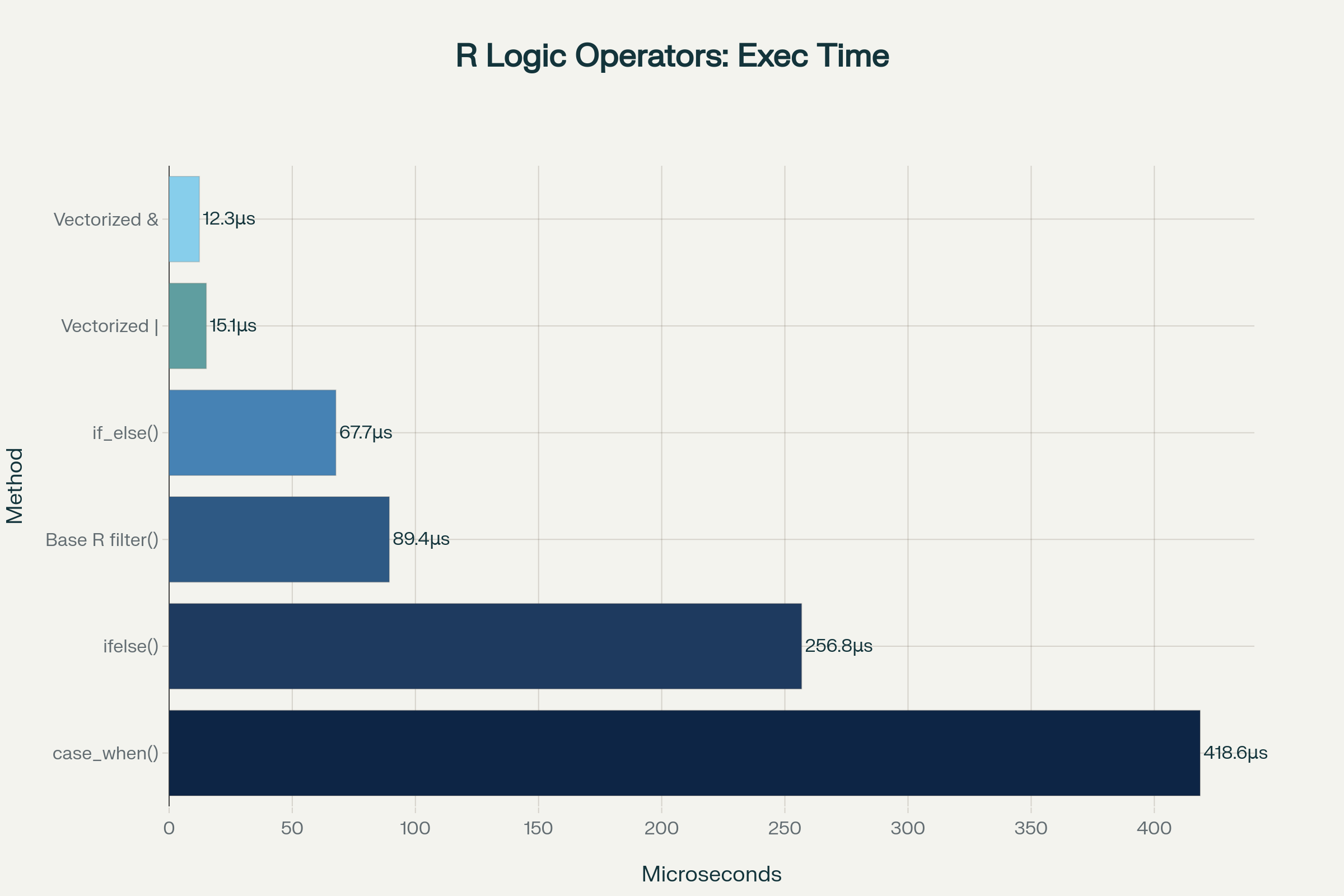
Performance comparison showing execution time and memory usage for different R logical operator methods
**Performance Rankings (Fastest to Slowest)**
- Vectorized
&and|- Native C implementation, optimal for element-wise operations if_else()- Type-safe and faster than base R alternatives- Base R
filter()- Efficient for data frame subsetting ifelse()- Slower due to type coercion overheadcase_when()- Most flexible but slowest for simple conditions
**Optimization Strategies**
- Use vectorized operations instead of loops whenever possible
- Pre-filter large datasets to reduce computational load
- Combine conditions efficiently using
&and|operators - Consider
data.tablefor extremely large datasets - Profile your code using
microbenchmarkfor critical performance sections
# Fast vectorized approach
# Define threshold values
threshold <- 20
limit <- 4

# Use built-in dataset
data <- mtcars

# Benchmark logical expression
system.time({
  result <- (data$mpg > threshold) & (data$cyl < limit)
})

# Avoid this slow approach
system.time({
  result <- logical(nrow(data))
  for (i in seq_len(nrow(data))) {
    result[i] <- (data$mpg[i] > threshold) & (data$cyl[i] < limit)
  }
})
- R code explanation:
- The first block uses vectorized logical operations to compare all rows at once, which is much faster.
- The second block uses a for-loop to check each row individually, which is much slower and not recommended for large datasets.
6. Error Handling and Troubleshooting
Robust R programming requires anticipating and handling errors that commonly occur with logical operations.
Common Error Scenarios
1. Vector Length Mismatch
# Problem: Using vectors in if() statements
if (c(TRUE, FALSE)) { print("error") }  # Error!

# Solution: Use any() or all()
if (any(c(TRUE, FALSE))) { print("At least one is TRUE") }
2. Missing Value Propagation
# Problem: NA values causing unexpected results
x <- c(1, 2, NA, 4)
result <- x > 2  # Returns c(FALSE, FALSE, NA, TRUE)

# Solution: Explicit NA handling
result <- ifelse(is.na(x), FALSE, x > 2)
# Or: result <- x > 2 & !is.na(x)
3. Type Coercion Issues
# Problem: Comparing different data types
chars <- c("a", "b", "c")
nums <- c(1, 2, 3)
result <- chars > nums  # May produce warnings

# Solution: Ensure consistent types
chars_as_factor <- as.numeric(as.factor(chars))
result <- chars_as_factor > nums
4. Defensive Programming Strategies
safe_logical_operation <- function(data, col1, col2, threshold) {
  tryCatch({
    # Validation checks
    if (!col1 %in% names(data) || !col2 %in% names(data)) {
      stop("Specified columns do not exist")
    }

    if (!is.numeric(data[[col1]]) || !is.numeric(data[[col2]])) {
      warning("Converting non-numeric columns to numeric")
      data[[col1]] <- as.numeric(data[[col1]])
      data[[col2]] <- as.numeric(data[[col2]])
    }

    # Perform operation with NA handling
    result <- ifelse(is.na(data[[col1]]) | is.na(data[[col2]]),
                     NA,
                     data[[col1]] > threshold & data[[col2]] > threshold)
    return(result)

  }, error = function(e) {
    cat("Error:", conditionMessage(e), "\n")
    return(NULL)
  })
}
Suppose you have a dataframe with columns named "score1" and "score2", and you want to check if both scores are greater than a threshold, say 75, while handling any errors or non-numeric entries robustly.
Sample Dataframe
df <- data.frame(
  ID = 1:5,
  score1 = c(90, 60, "85", NA, 76),
  score2 = c(80, 82, 99, 70, NA)
)
Apply the Defensive Function
Assuming you've defined the safe_logical_operation() function as shown previously, here’s how you would use it:
# Define the defensive function from earlier

df$both_high <- safe_logical_operation(df, "score1", "score2", threshold = 75)
print(df)
Output Table
| ID | score1 | score2 | both_high |
|---|---|---|---|
| 1 | 90 | 80 | TRUE |
| 2 | 60 | 82 | FALSE |
| 3 | 85 | 99 | TRUE |
| 4 | NA | 70 | NA |
| 5 | 76 | NA | NA |
- For each row,
both_highis:TRUEif bothscore1andscore2are above 75FALSEotherwiseNAif either value is missing or non-convertible
7. Truth Tables and Logical Behavior
Understanding how R handles different logical combinations, especially with NA values, is crucial for writing robust code.
NA Behavior in Logical Operations
R follows a three-valued logic system where NA represents "unknown":
NA & TRUE→NA(unknown, could be either)NA & FALSE→FALSE(definitely false regardless of NA)NA | TRUE→TRUE(definitely true regardless of NA)NA | FALSE→NA(unknown, could be either)
This behavior reflects real-world uncertainty and prevents false conclusions from incomplete data.
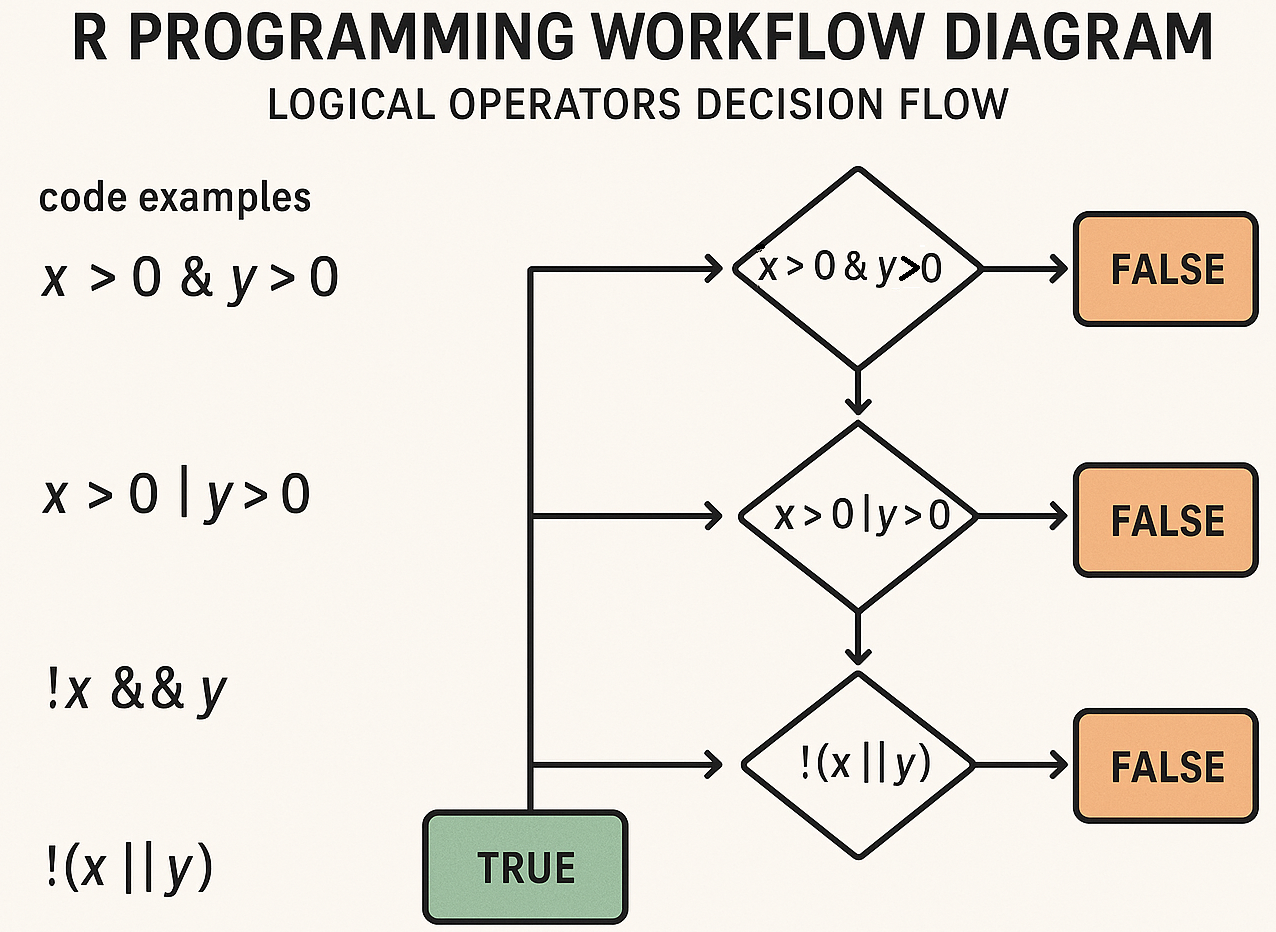
R logical operators workflow and decision flow diagram
**Resource download links**
1.3.4.-Logical-Operators-in-R.zip