2.2.4. Working with Databases and Relational Data
1. Introduction to Databases and Relational Data
- Most real-world data is stored across multiple related tables, not just in single files like CSV or Excel.
- Relational data: Data organized in multiple tables, linked by unique identifiers (keys).
- Relational databases (e.g., SQLite, MySQL, PostgreSQL) efficiently store, manage, and query such data.
- R can connect to and work with relational databases using packages like RSQLite, DBI, dplyr, and dbplyr.
2. Why Use Relational Data?
- Efficient Data Storage: Avoids duplication by storing related info in separate tables.
- Avoids Ambiguity: Unique identifiers (keys) clarify relationships, even when names are duplicated.
- Privacy: Sensitive data can be stored in separate tables with restricted access.
- Scalability: Databases handle large datasets and complex queries efficiently.
3. Example: Relational Data Structure
Suppose you have four tables:
- restaurants: id, name, address, type
- inspections: inspection_id, restaurant_id, date, inspector, rating
- ratings: rating_id, restaurant_id, stars
- owners: owner_id, name, contact
Relational mapping:
restaurants.idis the PK for restaurants.inspections.restaurant_idandratings.restaurant_idare FK referencingrestaurants.id.restaurants.owner_idis a FK referencingowners.owner_id.
Example Data: restaurants
| id | name | address | type | owner_id |
|---|---|---|---|---|
| JJ29 | Taco Stand | 123 Main St | Mexican | OW1 |
| AB12 | Pizza Hub | 456 Oak Ave | Italian | OW2 |
| XY88 | Curry House | 789 Pine Rd | Indian | OW1 |
inspections
| inspection_id | restaurant_id | date | inspector | rating |
|---|---|---|---|---|
| INSP1 | JJ29 | 2023-01-10 | Smith | A |
| INSP2 | AB12 | 2023-02-15 | Lee | B |
| INSP3 | XY88 | 2023-03-05 | Patel | A |
ratings
| rating_id | restaurant_id | stars |
|---|---|---|
| R1 | JJ29 | 4.5 |
| R2 | AB12 | 4.0 |
| R3 | XY88 | 4.8 |
owners
| owner_id | name | contact |
|---|---|---|
| OW1 | Alice Brown | 555-1234 |
| OW2 | Bob Smith | 555-5678 |
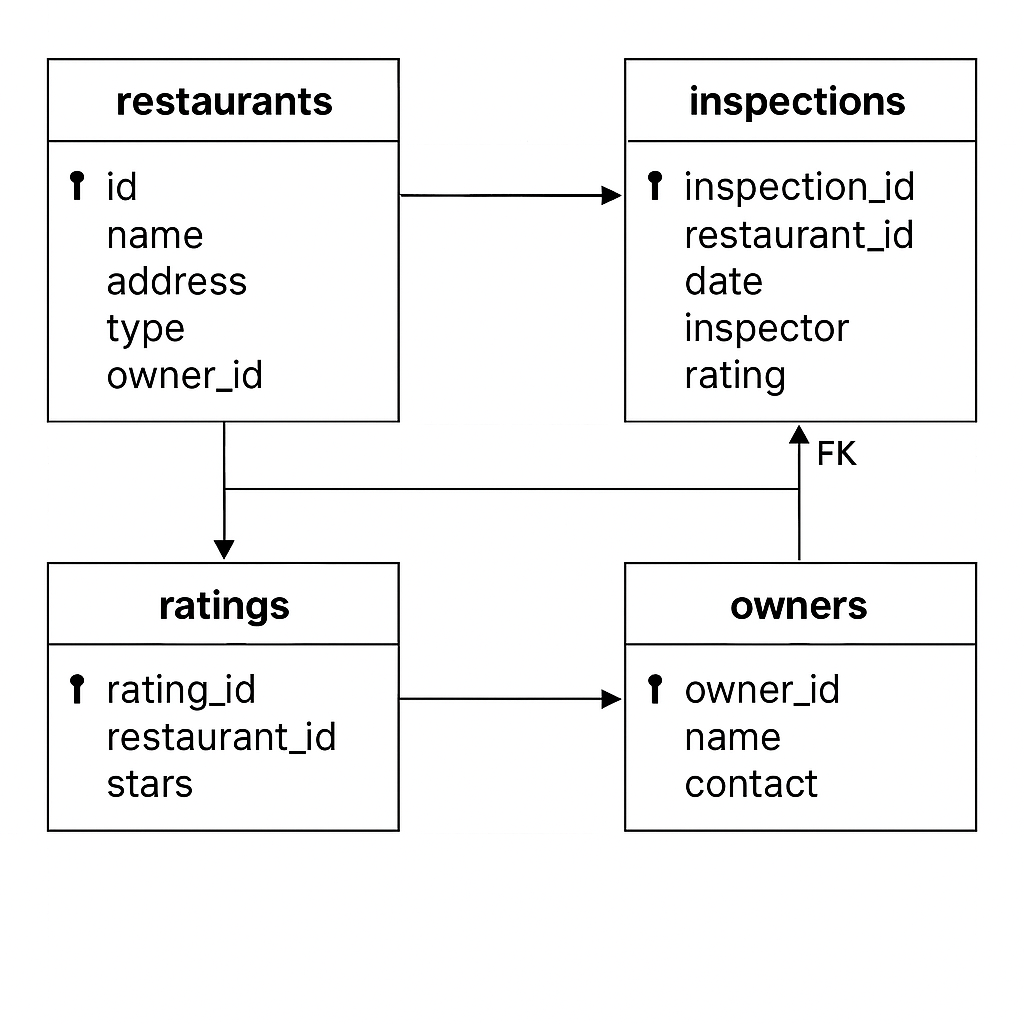
- PK: Primary Key (unique identifier in the table)
- FK: Foreign Key (references the primary key in another table)
This mapping shows:
restaurantsis central, linked toinspectionsandratingsviaid.restaurants.owner_idlinks toowners.owner_id.inspectionsandratingsboth referencerestaurantsviarestaurant_id.
This structure allows you to join and relate information across all four tables using their keys.
4. Introduction to SQL and SQLite
- SQL (Structured Query Language): Standard language for querying relational databases.
- SQLite: Lightweight, file-based relational database, easy to use with R.
5. Connecting to a Database with RSQLite
- Use the
RSQLitepackage to connect to SQLite databases. - Install the package if not already installed:
# install.packages("RSQLite")

library(RSQLite)

# Specify driver and connect to database

sqlite <- dbDriver("SQLite")
db <- dbConnect(sqlite, "company.db")

# List tables in the database

dbListTables(db)

dbDisconnect(db)
Here's how to create the given relational database schema and populate it using R with the RSQLite package.
1. Create the Tables in the Database
library(RSQLite)

# Connect to the database (creates company.db if not exists)
db <- dbConnect(SQLite(), "company.db")

# Owners table
dbExecute(db, "
  CREATE TABLE owners (
    owner_id TEXT PRIMARY KEY,
    name TEXT,
    contact TEXT
  )
")

# Restaurants table
dbExecute(db, "
  CREATE TABLE restaurants (
    id TEXT PRIMARY KEY,
    name TEXT,
    address TEXT,
    type TEXT,
    owner_id TEXT,
    FOREIGN KEY(owner_id) REFERENCES owners(owner_id)
  )
")

# Inspections table
dbExecute(db, "
  CREATE TABLE inspections (
    inspection_id TEXT PRIMARY KEY,
    restaurant_id TEXT,
    date TEXT,
    inspector TEXT,
    rating TEXT,
    FOREIGN KEY(restaurant_id) REFERENCES restaurants(id)
  )
")

# Ratings table
dbExecute(db, "
  CREATE TABLE ratings (
    rating_id TEXT PRIMARY KEY,
    restaurant_id TEXT,
    stars REAL,
    FOREIGN KEY(restaurant_id) REFERENCES restaurants(id)
  )
")
2. Insert the Data Rows
# Insert owners
dbExecute(db, "INSERT INTO owners VALUES ('OW1', 'Alice Brown', '555-1234')")
dbExecute(db, "INSERT INTO owners VALUES ('OW2', 'Bob Smith', '555-5678')")

# Insert restaurants
dbExecute(db, "INSERT INTO restaurants VALUES ('JJ29', 'Taco Stand',  '123 Main St',  'Mexican', 'OW1')")
dbExecute(db, "INSERT INTO restaurants VALUES ('AB12', 'Pizza Hub',   '456 Oak Ave',  'Italian', 'OW2')")
dbExecute(db, "INSERT INTO restaurants VALUES ('XY88', 'Curry House', '789 Pine Rd',  'Indian',  'OW1')")

# Insert inspections
dbExecute(db, "INSERT INTO inspections VALUES ('INSP1', 'JJ29', '2023-01-10', 'Smith', 'A')")
dbExecute(db, "INSERT INTO inspections VALUES ('INSP2', 'AB12', '2023-02-15', 'Lee', 'B')")
dbExecute(db, "INSERT INTO inspections VALUES ('INSP3', 'XY88', '2023-03-05', 'Patel', 'A')")

# Insert ratings
dbExecute(db, "INSERT INTO ratings VALUES ('R1', 'JJ29', 4.5)")
dbExecute(db, "INSERT INTO ratings VALUES ('R2', 'AB12', 4.0)")
dbExecute(db, "INSERT INTO ratings VALUES ('R3', 'XY88', 4.8)")
3. Verify: List Tables
# List all tables
dbListTables(db)
You should see:
dbListTables(db)
[1] "inspections" "owners"      "ratings"     "restaurants"
4. Disconnect
dbDisconnect(db)
This code will create the four related tables and insert all the example data as you specified, using foreign key constraints to reflect the relationships between entities. If you want to run queries or further interact with the data, let me know!
6. Accessing Tables with dbplyr and dplyr
- Use
dbplyranddplyrto work with database tables as if they were data frames.
library(RSQLite)
library(dbplyr)
library(dplyr)

db <- dbConnect(SQLite(), "company.db")

inspections <- tbl(db, "inspections")
owners <- tbl(db, "owners")
ratings <- tbl(db, "ratings")
restaurants <- tbl(db, "restaurants")

inspections

dbDisconnect(db)
Output:
# Source:   table<`inspections`> [?? x 5]
# Database: sqlite 3.50.3 [C:\Users\gnana\OneDrive\Documents\R Programming\a2zlearners.com\SAStoR\2.2.4.-Working-with-Databases-and-Relational-Data\company.db]
  inspection_id restaurant_id date       inspector rating
  <chr>         <chr>         <chr>      <chr>     <chr>
1 INSP1         JJ29          2023-01-10 Smith     A
2 INSP2         AB12          2023-02-15 Lee       B
3 INSP3         XY88          2023-03-05 Patel     A
7. Mutating Joins: Combining Tables
- Mutating joins combine variables from two tables using a key (e.g.,
restaurant_id). - Types of mutating joins:
- inner_join(): Only rows with keys in both tables.
- left_join(): All rows from the first table, matched rows from the second.
- right_join(): All rows from the second table, matched rows from the first.
- full_join(): All rows from both tables.
Input Example:
restaurantstable: id, name, address, type, owner_idinspectionstable: inspection_id, restaurant_id, date, inspector, rating
R Example:
# Inner join
inner <- inner_join(restaurants, inspections, by = c("id" = "restaurant_id"))
as_tibble(inner)
Expected Output:
| id | name | address | type | owner_id | inspection_id | date | inspector | rating |
|---|---|---|---|---|---|---|---|---|
| JJ29 | Taco Stand | 123 Main St | Mexican | OW1 | INSP1 | 2023-01-10 | Smith | A |
| AB12 | Pizza Hub | 456 Oak Ave | Italian | OW2 | INSP2 | 2023-02-15 | Lee | B |
| XY88 | Curry House | 789 Pine Rd | Indian | OW1 | INSP3 | 2023-03-05 | Patel | A |
Other joins:
# Left join
left <- left_join(restaurants, inspections, by = c("id" = "restaurant_id"))
as_tibble(left)

# Right join
right <- right_join(as_tibble(restaurants), as_tibble(inspections), by = c("id" = "restaurant_id"))
as_tibble(right)

# Full join
full <- full_join(as_tibble(restaurants), as_tibble(inspections), by = c("id" = "restaurant_id"))
as_tibble(full)
8. Filtering Joins: Filtering Observations
- Filtering joins affect which rows are kept, not which columns.
- semi_join(x, y): Keeps rows in
xwith a match iny. - anti_join(x, y): Keeps rows in
xwith no match iny.
- semi_join(x, y): Keeps rows in
R Example:
# Semi join: restaurants with inspections
semi <- semi_join(restaurants, inspections, by = c("id" = "restaurant_id"))
as_tibble(semi)

# Anti join: restaurants without inspections
anti <- anti_join(restaurants, inspections, by = c("id" = "restaurant_id"))
as_tibble(anti)
Expected Output for semi_join:
| id | name | address | type | owner_id |
|---|---|---|---|---|
| JJ29 | Taco Stand | 123 Main St | Mexican | OW1 |
| AB12 | Pizza Hub | 456 Oak Ave | Italian | OW2 |
| XY88 | Curry House | 789 Pine Rd | Indian | OW1 |
Expected Output for anti_join:
If all restaurants have inspections, the output will be an empty tibble.
9. Connecting to Remote Databases
- For large or remote databases, connect using credentials (host, user, password).
- Use
DBIand a database-specific package (e.g.,RMySQL,RPostgres).
R Example:
# Example only; replace with your credentials
con <- DBI::dbConnect(RMySQL::MySQL(),
  host = "database.host.com",
  user = "yourusername",
  password = rstudioapi::askForPassword("database_password")
)
10. Input and Output Table Summary
| Operation | R Function / Package | Input Example | Output Example |
|---|---|---|---|
| Connect to SQLite | dbConnect() |
.db file | DB connection |
| List tables | dbListTables() |
DB connection | Table names |
| Access table | tbl() |
DB connection, name | Table (tbl) |
| Mutating join | *_join() |
Two tables | Combined table |
| Filtering join | semi_join(), anti_join() |
Two tables | Filtered table |
11. Beyond the Basics: Exploring Databases in R
- Query large datasets efficiently: Only pull the data you need, not the whole table.
- Write SQL directly in R: Use
dbGetQuery()for custom SQL queries. - Create, update, or delete tables: Use
dbWriteTable(),dbRemoveTable(), etc. - Work with other databases: Use
RPostgres,RMariaDB,RODBC, etc. for PostgreSQL, MariaDB, SQL Server, etc. - Database transactions: Use
dbBegin(),dbCommit(),dbRollback()for advanced workflows. - Combine with dplyr verbs: Filter, mutate, group, and summarize directly on database tables.
- Export query results: Use
collect()to bring data into R as a tibble/data frame for further analysis or export.
R Example: Custom SQL Query
# Get all inspections
dbGetQuery(db, "SELECT * FROM inspections")
12. Summary and Best Practices
- Use relational databases for efficient, scalable, and organized data storage.
- Use unique identifiers to link tables and avoid ambiguity.
- Use
RSQLite,dplyr, anddbplyrfor seamless database access and manipulation in R. - Use mutating joins to combine tables and filtering joins to filter observations.
- For large or remote databases, connect directly and only pull the data you need.
- Always close your database connection with
dbDisconnect()when done.
**Resource download links**
2.2.4.-Working-with-Databases-and-Relational-Data.zip