3.1.2. Shiny App Structure
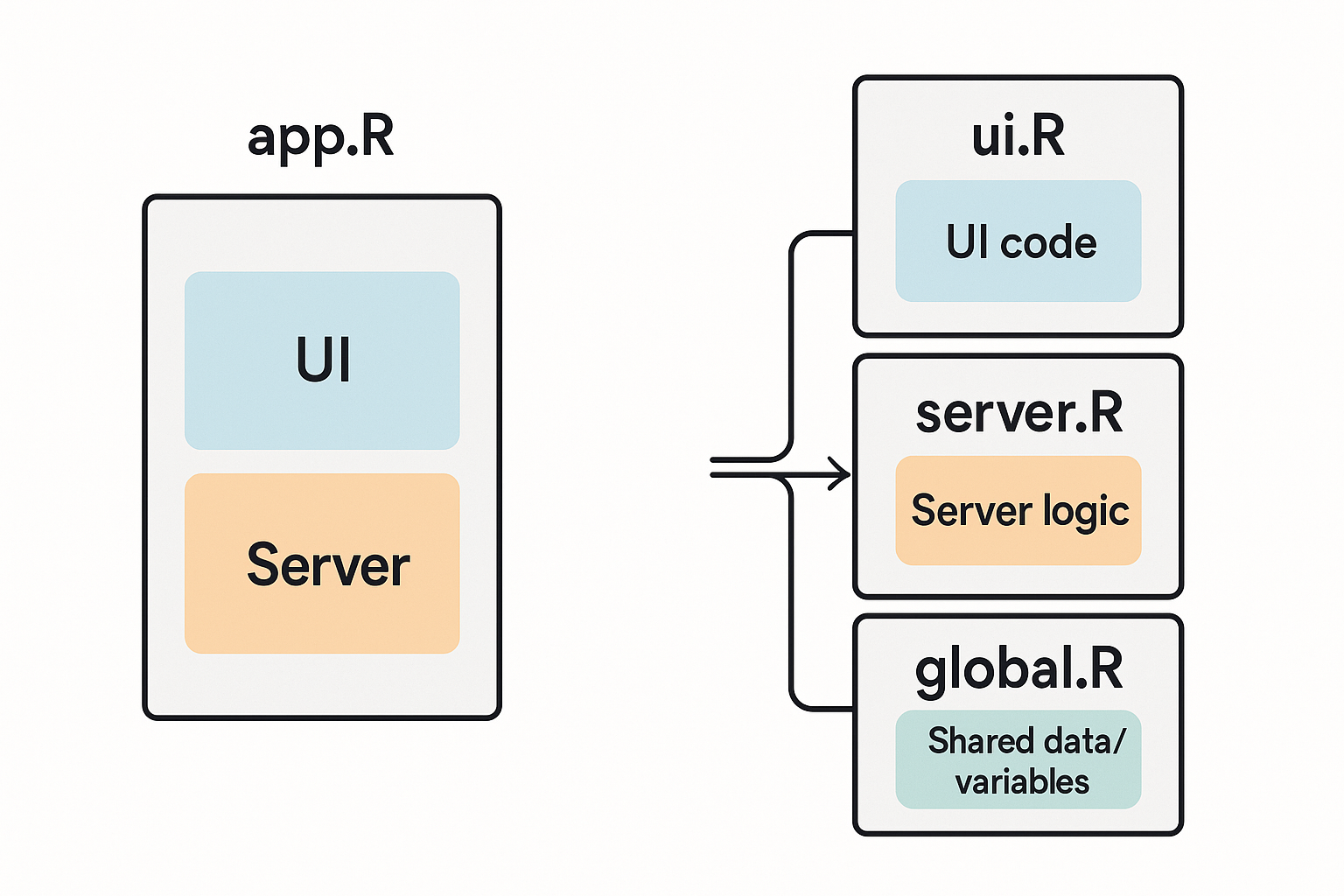
Comparison of single-file vs multi-file R Shiny app structures
Understanding the structure of R Shiny applications is crucial for building maintainable, scalable, and professional web applications. This comprehensive guide explores the fundamental architectural decisions you'll face when developing Shiny apps, focusing on the choice between single-file and multi-file approaches, the role of UI and server functions, and the power of the shinyApp() function.
3.1.3. Understanding Shiny Application Architecture
R Shiny applications follow a reactive programming paradigm where user interfaces automatically update in response to user interactions. At its core, every Shiny app consists of two essential components: a user interface (UI) that defines what users see and interact with, and a server that contains the logic for processing user inputs and generating outputs.
The architecture choice between single-file and multi-file approaches significantly impacts code organization, maintainability, and team collaboration capabilities.
3.1.4. Single-file Architecture: The app.R Approach
3.1.4.1. Structure and Implementation
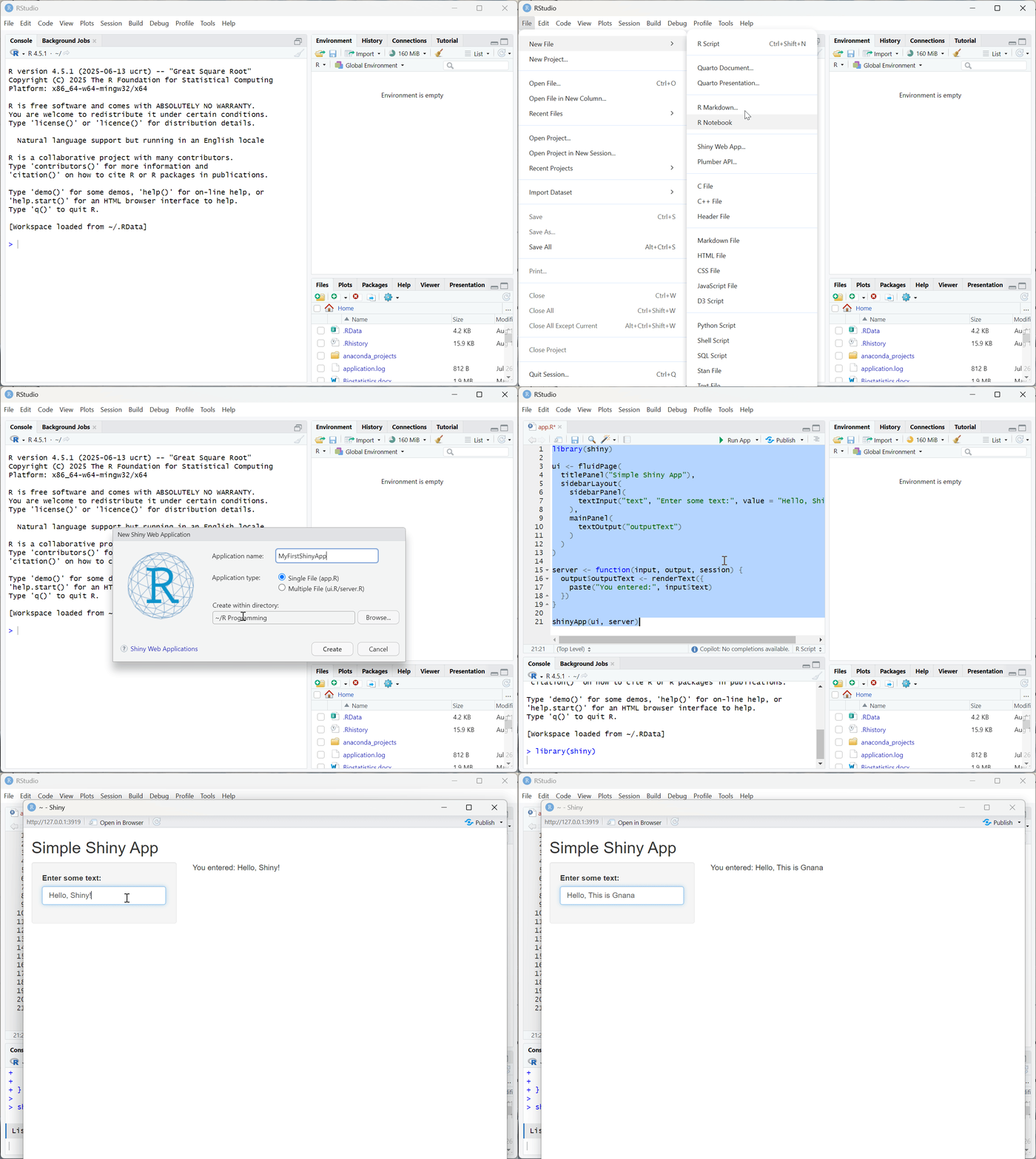
The single-file approach consolidates all application logic into a single app.R file. This file contains:
- Library imports and package loading
- UI definition using functions like
fluidPage(),sidebarLayout(), etc. - Server function containing reactive logic
- The
shinyApp()call to launch the application
library(shiny)

ui <- fluidPage(
  titlePanel("Simple Shiny App"),
  sidebarLayout(
    sidebarPanel(
      textInput("text", "Enter some text:", value = "Hello, Shiny!")
    ),
    mainPanel(
      textOutput("outputText")
    )
  )
)

server <- function(input, output, session) {
  output$outputText <- renderText({
    paste("You entered:", input$text)
  })
}

shinyApp(ui, server)
3.1.4.2. Advantages of Single-file Structure
Simplicity and Quick Prototyping: The single-file approach excels for rapid prototyping and small applications. All code is contained in one location, making it easy to understand the complete application flow at a glance.
Ease of Sharing: Single-file apps are incredibly easy to share - simply send the app.R file and recipients can run the entire application.
Beginner-Friendly: New Shiny developers often find the single-file approach less intimidating, as there's no need to understand file relationships and dependencies.
3.1.4.3. Limitations and Scalability Concerns
As applications grow in complexity, the single-file approach presents significant challenges:
- Code Management: Files can easily exceed 500-1000 lines, becoming difficult to navigate and maintain
- Collaboration Issues: Multiple developers working on the same file leads to merge conflicts and coordination problems
- Debugging Complexity: Mixing UI, server logic, and initialization code makes troubleshooting more challenging
3.1.5. Multi-file Architecture: The Modular Approach
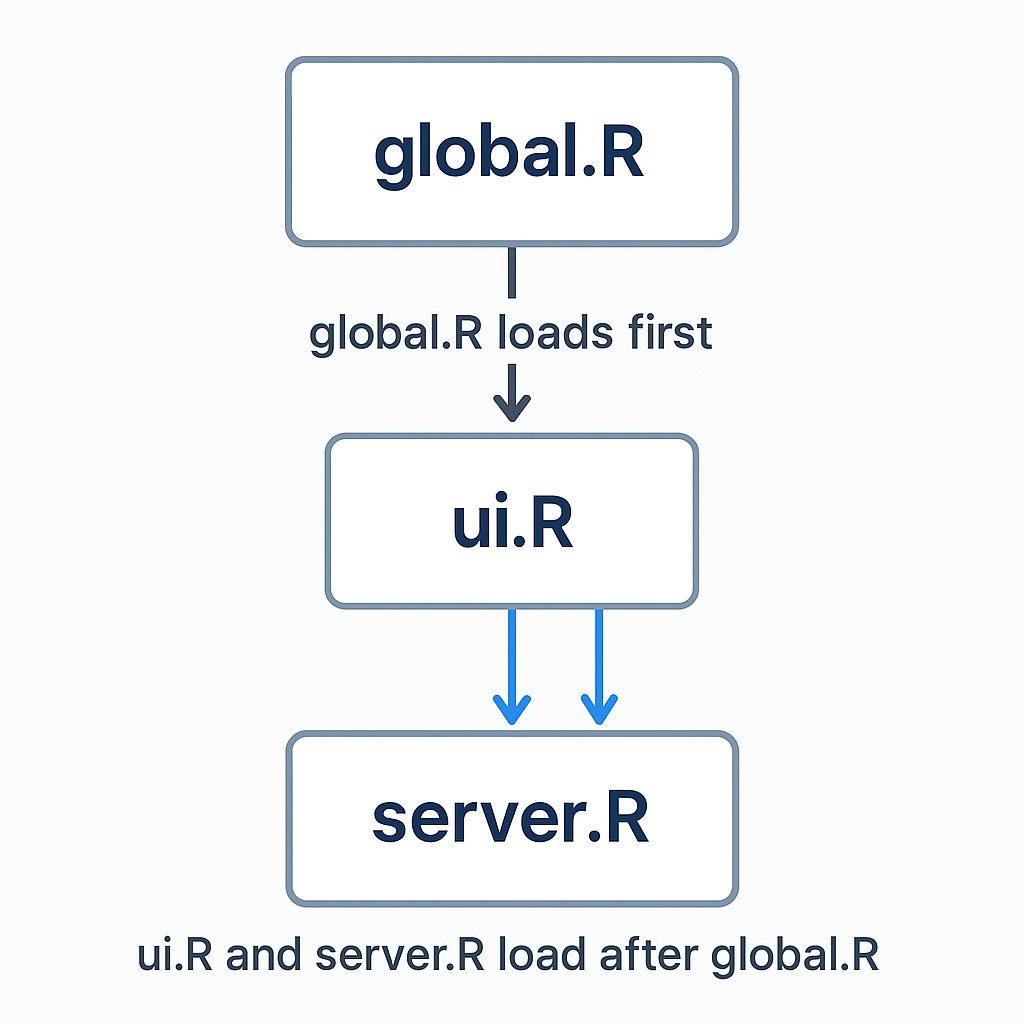
File execution order in Shiny applications
3.1.5.1. The Three-File Foundation
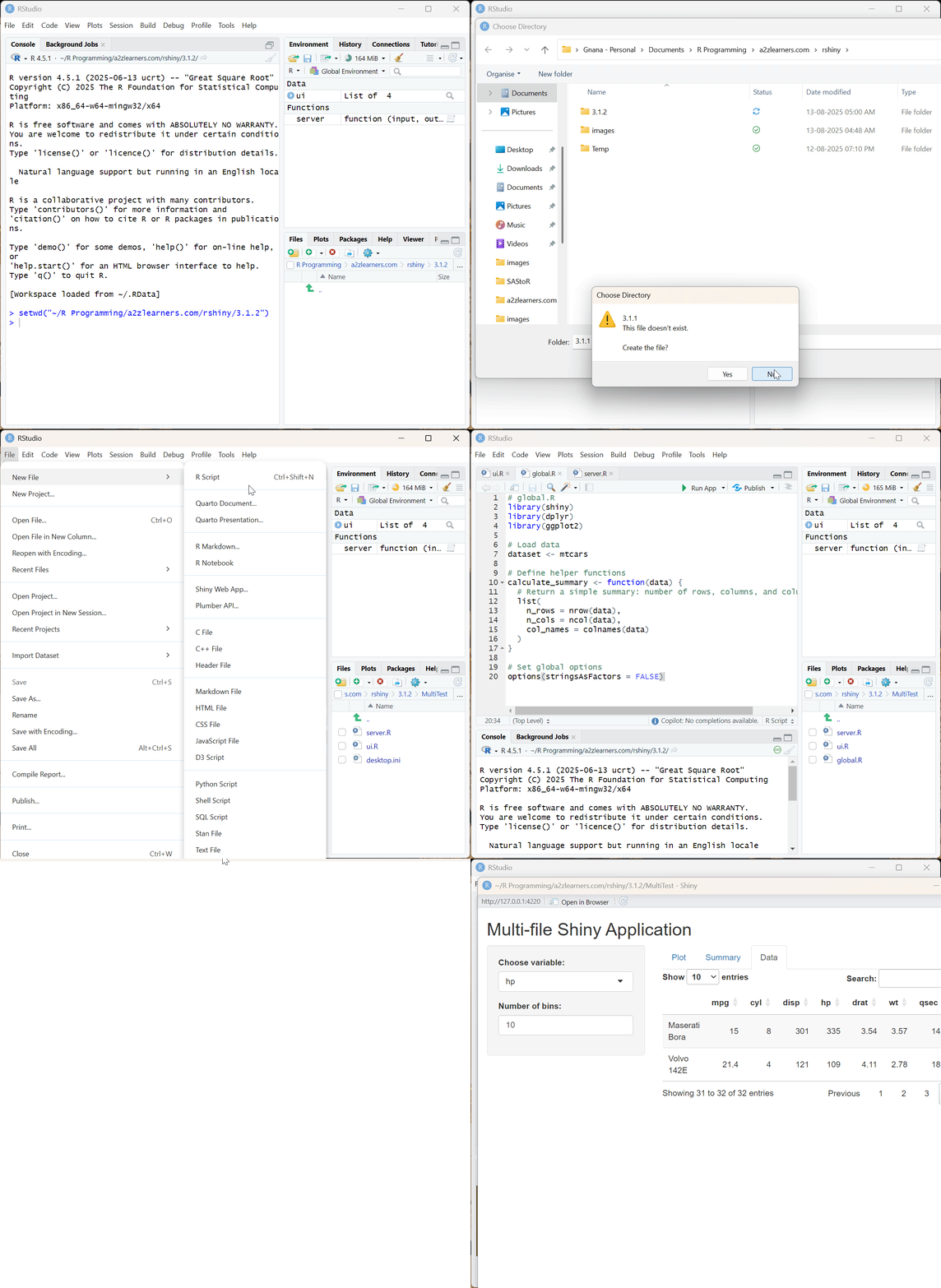
The multi-file approach separates concerns into distinct files, each with specific responsibilities:
1. global.R - Application Initialization
The global.R file runs once when the application starts and is available to both UI and server components. This file typically contains:
# global.R
library(shiny)
library(dplyr)
library(ggplot2)

# Load data
dataset <- mtcars

# Define helper functions
calculate_summary <- function(data) {
  # Return a simple summary: number of rows, columns, and column names
  list(
    n_rows = nrow(data),
    n_cols = ncol(data),
    col_names = colnames(data)
  )
}

# Set global options
options(stringsAsFactors = FALSE)
2. ui.R - User Interface Definition
The ui.R file contains all UI elements and layout specifications:
# ui.R
ui <- fluidPage(
  titlePanel("Multi-file Shiny Application"),
  sidebarLayout(
    sidebarPanel(
      selectInput("variable", "Choose variable:",
                  choices = names(dataset)),
      numericInput("bins", "Number of bins:",
                   value = 30, min = 1, max = 50)
    ),
    mainPanel(
      tabsetPanel(
        tabPanel("Plot", plotOutput("histogram")),
        tabPanel("Summary", verbatimTextOutput("summary")),
        tabPanel("Data", dataTableOutput("table"))
      )
    )
  )
)
3. server.R - Server Logic
The server.R file contains all reactive logic and output generation:
# server.R
server <- function(input, output, session) {

  # Reactive data processing
  filtered_data <- reactive({
    dataset %>%
      filter(!is.na(.data[[input$variable]]))
  })

  # Output generation
  output$histogram <- renderPlot({
    ggplot(filtered_data(), aes_string(x = input$variable)) +
      geom_histogram(bins = input$bins, fill = "steelblue", alpha = 0.7) +
      theme_minimal()
  })

  output$summary <- renderPrint({
    summary(filtered_data()[[input$variable]])
  })

  output$table <- renderDataTable({
    filtered_data()
  })
}
3.1.5.2. Advanced Multi-file Organization
For larger applications, the multi-file approach can be extended with additional organizational patterns:
Module Files: Create separate R files for Shiny modules in an R/ directory
Utility Functions: Store helper functions in utils/ or functions/ directories
Static Assets: Place CSS, JavaScript, and images in a www/ directory
Configuration: Maintain app settings in config/ files
3.1.6. The shinyApp() Function: Bringing It All Together
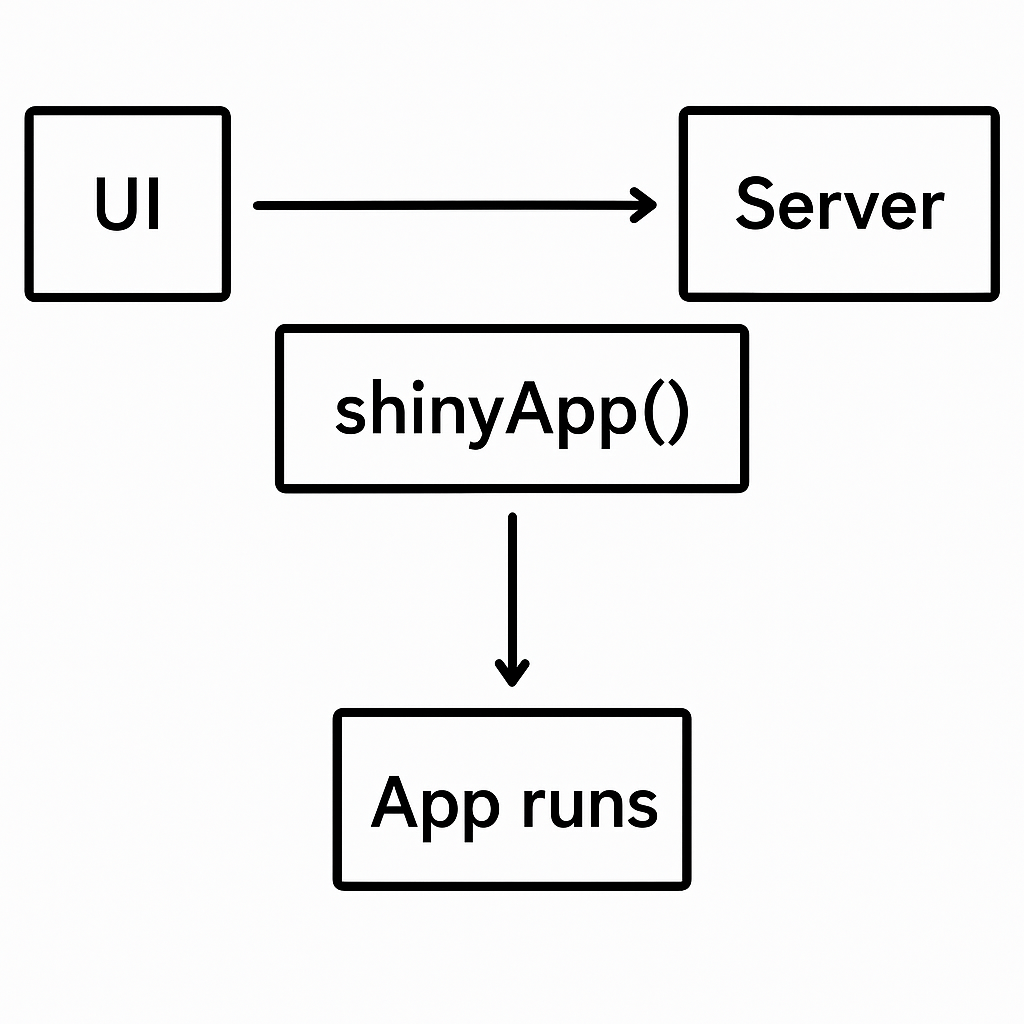
Visual representation of shinyApp function workflow
3.1.6.1. Function Mechanics and Execution
The shinyApp() function serves as the bridge between UI and server components, creating the complete application object. This function:
- Accepts
uiandserveras primary arguments - Validates the UI structure and server function
- Establishes the reactive framework
- Returns a Shiny app object ready for execution
# Complete shinyApp call with options
app <- shinyApp(
  ui = ui,
  server = server,
  options = list(
    port = 3838,
    host = "0.0.0.0",
    launch.browser = TRUE
  )
)

# Run the app
runApp(app)
3.1.6.2. Execution Order and Performance Implications
Understanding the execution order is crucial for performance optimization:
| Execution Context | When Executed | Use Cases | Performance Impact |
|---|---|---|---|
| shinyApp() function call | Once when app launches | Initialize and launch app | Minimal - one-time cost |
| Code outside server function | Once when app starts | Load packages, data, define functions | Low - cached globally |
| Code inside server function | Once per user session | User-specific initialization | Medium - per user overhead |
| Code inside render* functions | Every time inputs change | Generate dynamic outputs | High - frequent execution |
| Reactive expressions | When dependencies change | Intermediate calculations | Variable - depends on caching |
| Observers | When dependencies change | Side effects, database updates | Variable - depends on complexity |
3.1.7. Architectural Decision Framework
3.1.7.1. Choosing Between Single-file and Multi-file
| Aspect | Single-file (app.R) | Multi-file (ui.R, server.R, global.R) |
|---|---|---|
| File Structure | One file contains everything | Separate files for each component |
| Code Organization | All code in one place | Clear separation of concerns |
| Best For | Small to medium apps, prototypes | Large, complex applications |
| Scalability | Limited - becomes unwieldy | Excellent - modular structure |
| Collaboration | Difficult - merge conflicts | Better - separate responsibilities |
| Debugging | Harder - everything mixed together | Easier - isolated components |
| Performance | Same as multi-file | Same as single-file |
| Learning Curve | Easier for beginners | Slightly steeper initially |
| Maintenance | Difficult for complex apps | Much easier to maintain |
3.1.7.2. When to Use Single-file Approach
Choose the single-file approach when:
- Building quick prototypes or proof-of-concepts
- Creating simple demonstrations or tutorials
- Working alone on small projects
- The entire application logic is under 200-300 lines
- Sharing standalone examples or reproductions
3.1.7.3. When to Use Multi-file Approach
The multi-file approach is recommended for:
- Production applications
- Team-based development projects
- Applications with complex business logic
- Long-term, maintained projects
- Applications requiring modular testing
- Projects with separate UI/UX design workflows
3.1.8. Advanced Architectural Patterns
3.1.8.1. Modular Design with Shiny Modules
For complex applications, Shiny modules provide an additional layer of organization. Modules encapsulate related UI and server logic into reusable components:
# Module UI function
counterUI <- function(id) {
  ns <- NS(id)
  tagList(
    actionButton(ns("button"), "Click me!"),
    verbatimTextOutput(ns("out"))
  )
}

# Module server function
counterServer <- function(id) {
  moduleServer(id, function(input, output, session) {
    count <- reactiveVal(0)

    observeEvent(input$button, {
      count(count() + 1)
    })

    output$out <- renderText({
      paste("Button clicked", count(), "times")
    })
  })
}
3.1.8.2. Package-based Architecture
For large-scale applications, organizing your Shiny app as an R package provides maximum structure and testing capabilities:
myShinyPackage/
├── DESCRIPTION
├── NAMESPACE
├── R/
│   ├── app.R
│   ├── ui_modules.R
│   ├── server_modules.R
│   └── utils.R
├── inst/
│   └── shiny/
│       └── www/
├── man/
└── tests/
3.1.9. Performance Optimization Strategies
3.1.9.1. Efficient Code Placement
Strategic placement of code significantly impacts application performance:
Global Scope (Executed Once):
- Library loading
- Data reading and preprocessing
- Function definitions
- Configuration settings
Server Function Scope (Per User):
- User-specific reactive values
- Session-specific initialization
- User state management
Reactive Scope (On Demand):
- Data filtering and transformation
- Plot generation
- Dynamic UI updates
3.1.9.2. Caching and Data Management
Implement caching strategies to improve performance:
# Use reactive expressions for expensive calculations
expensive_calculation <- reactive({
  # This will only run when dependencies change
  heavy_processing(input$data_source)
})

# Cache results using memoise
library(memoise)
cached_function <- memoise(expensive_function)
3.1.10. Best Practices and Recommendations
3.1.10.1. File Organization Standards
Follow these organizational principles for maintainable code:
- Separation of Concerns: Keep UI, server, and initialization logic separate
- Modular Design: Break large applications into logical modules
- Consistent Naming: Use clear, descriptive names for files and functions
- Documentation: Include comments and documentation for complex logic
- Version Control: Structure files to minimize merge conflicts
3.1.10.2. Code Quality Guidelines
Maintain high code quality with these practices:
- No Single File Over 500 Lines: Split large files into smaller, focused components
- Consistent Code Style: Follow established R style guides
- Error Handling: Implement robust error handling and validation
- Testing: Write unit tests for complex logic
- Performance Monitoring: Regular profiling and optimization
3.1.11. Migration Strategies
3.1.11.1. From Single-file to Multi-file
When your application outgrows the single-file approach:
- Extract Global Code: Move library calls and data loading to
global.R - Separate UI Logic: Extract UI definition to
ui.R - Isolate Server Logic: Move server function to
server.R - Create Modules: Break complex UI/server pairs into modules
- Add Testing: Implement testing framework for reliability
3.1.11.2. Gradual Modularization
For existing applications, implement modular design incrementally:
# Start with functional extraction
source("R/data_processing.R", local = TRUE)
source("R/plotting_functions.R", local = TRUE)
source("R/ui_components.R", local = TRUE)

# Progress to full modules
source("R/dashboard_module.R", local = TRUE)
source("R/analysis_module.R", local = TRUE)
3.1.12. Future-Proofing Your Architecture
3.1.12.1. Scalability Considerations
Design your application architecture with growth in mind:
- Database Integration: Plan for external data sources
- Authentication: Consider user management requirements
- Deployment: Design for production environments
- Monitoring: Include logging and performance tracking
- Internationalization: Support multiple languages if needed
3.1.12.2. Technology Integration
Modern Shiny applications often integrate with other technologies:
- Frontend Frameworks: Custom JavaScript and CSS
- Backend Services: APIs and microservices
- Cloud Platforms: Scalable hosting solutions
- DevOps Tools: CI/CD pipelines and automated testing
The choice between single-file and multi-file Shiny application architecture is fundamental to your project's success. While single-file applications offer simplicity and rapid prototyping capabilities, multi-file approaches provide the structure and maintainability required for professional, scalable applications. Understanding the shinyApp() function's role in connecting UI and server components, combined with strategic code organization and performance optimization, enables you to build robust Shiny applications that can grow with your needs.
By following the architectural patterns and best practices outlined in this guide, you'll be well-equipped to make informed decisions about your Shiny application structure, ensuring long-term maintainability and optimal performance regardless of your project's complexity.
**Resource download links**
3.1.2.-Shiny-App-Structure.zip